This article describes how to check scan capacity for a Cintoo subscription.
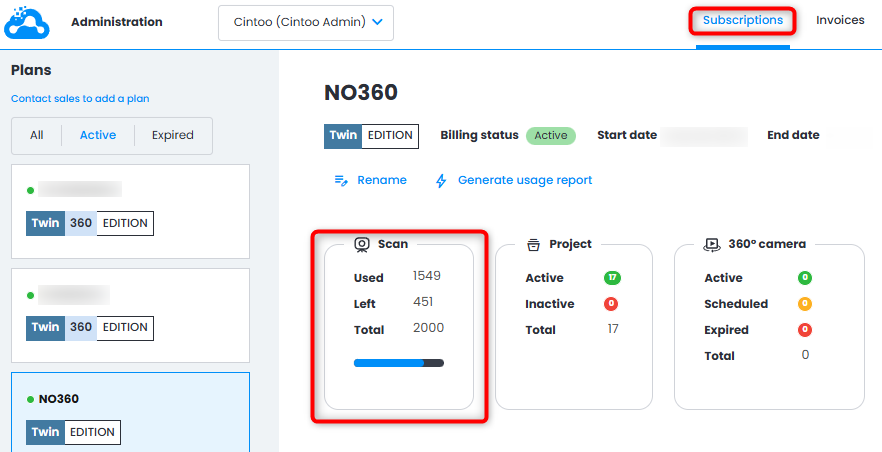
This functionality is available on Subscriptions tab on Administration page from burger menu at the top right.
Scan count is a cumulative sum of all scans in all Cintoo projects created in an individual Cintoo account:
- Each terrestrial, drone or unified point cloud scan counts as 1 scan.
- Mobile scanning positions count as 1 scan per 3 positions, added up over the whole subscription and rounded down.
For example, 31 mobile positions count as 10 scans, and 2 mobile positions alone count as 0. - Mobile scanning positions imported before November 25, 2026 count as 1 scan each.
Example of a subscription's scan count:
| Import | Imported | Counts as |
|---|---|---|
| Terrestrial scans | 5 scans | 5 scans |
| Mobile import 1 | 32 positions | 13 scans for 39 positions added up |
| Mobile import 2 | 7 positions | included above |
| Mobile import before November 25, 2026 | 4 positions | 4 scans |
| Total | 22 scans |
Also good to know:
- Scan count of a project includes every mobile scanning position, so it can be higher than scan capacity the project uses. Project details show both types separately, for example 4 terrestrial + 6 positions.
- When used scans exceed total capacity, Left shows a negative number.
- Reaching capacity, it's possible to increase max scan capacity or delete scans from existing projects to continue using Cintoo. Contact your Cintoo Sales Representative or sales@cintoo.com to do that.
Mobile and drone point cloud imports with Cintoo Connect 2.19 start as long as at least 1 scan of capacity is left, and always complete. If an import goes over capacity, a message tells you at the end. Import is disabled when no capacity is left.
If attempted to upload with Cintoo Connect terrestrial scans, 360 images, inspection data or unified point clouds exceeding the capacity of the subscription, the following message is shown allowing to proceed until the scan capacity is full. In this case a part of scans/360 images won't be uploaded.

Was this article helpful?
That’s Great!
Thank you for your feedback
Sorry! We couldn't be helpful
Thank you for your feedback
Feedback sent
We appreciate your effort and will try to fix the article