What Is 360 Edition?
Cintoo 360 Edition is a specialized subscription that extends Cintoo platform with automated 360-degree video capture, import, and visualization capabilities. It enables organizations to efficiently document industrial sites using 360 imagery, creating a visual layer that complements laser scans and 3D models within a unified digital environment.
360 Edition automates traditionally manual processes of uploading and managing 360 visual data, allowing teams to quickly capture, align, and share site documentation for inspection, collaboration, and decision-making.
Learn more on our website: 360 Edition
TABLE OF CONTENTS
- What Is 360 Edition?
- Who Is 360 Edition for?
- What's Included
- Supported 360 Cameras
- Getting Started
- Typical Workflows
- What's Coming Next
- Need Help?
Who Is 360 Edition for?
360 Edition is designed specifically for:
- Industrial asset owners and operators
- EPC (Engineering, Procurement, and Construction) companies
- Facility managers
- Industry 4.0 organizations and their suppliers
Key Industries
- Energy (Oil & Gas, Power Generation)
- Water treatment facilities
- Manufacturing (Automotive, Heavy Industry)
- Large brownfield industrial sites
- Multi-site industrial operations
What's Included
360 Edition subscription includes:
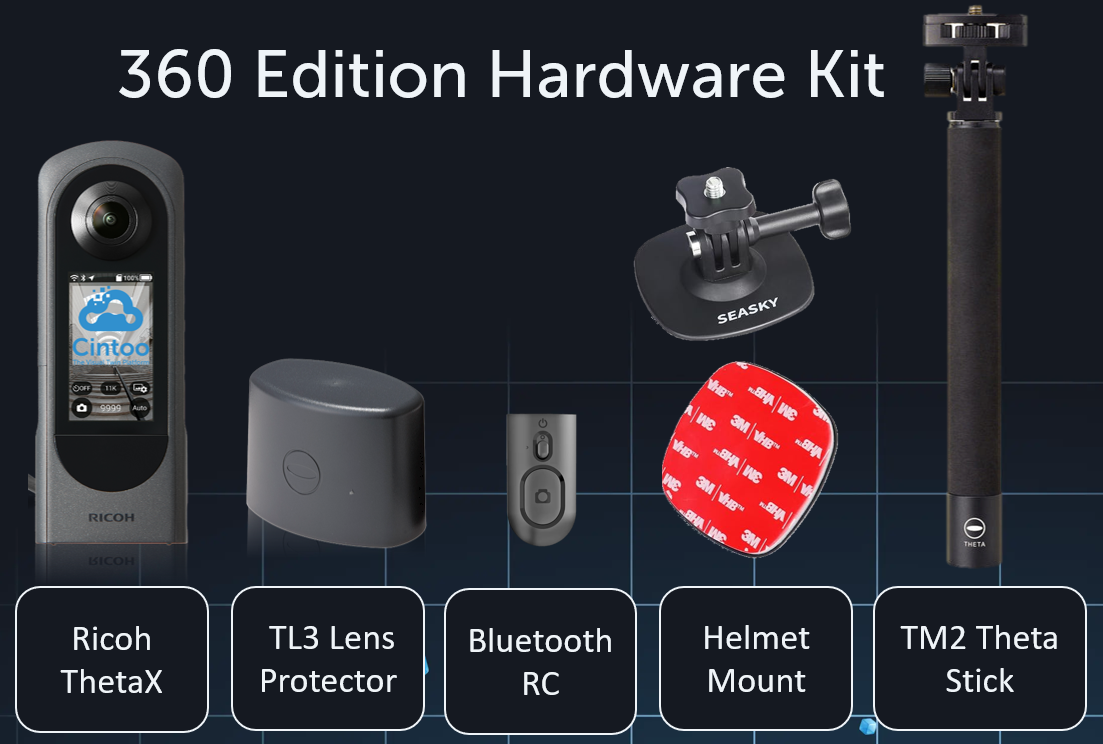
- Camera rental – access to certified Ricoh THETA X cameras as part of subscription
- 'Simple Capture' plugin preinstalled on Ricoh cameras, with preset capture parameters
- Remote control preset to each individual camera via Bluetooth to start/stop video recording
- Collaboration features – share 360 visual data across organization
- Crop and tagging features - slice your 3D data and leverage Cintoo's tag editing and visualization tools (including Tag Crop IN/OUT, Click & Tag etc.)
- 360 Explorer – dedicated interface for browsing and navigating 360 captures
- 3D visualization – view 360 content integrated with existing project data
- Gaussian Splatting – advanced 3D visualization technology for immersive viewing
- Integration with TWIN and BIM Editions – combine 360 data with point clouds and models
Supported 360 Cameras
Currently, 360 Edition supports:
- Ricoh THETA X
Ricoh THETA X is provided as part of 360 Edition subscription through a rental model. Customer-owned cameras, including Ricoh THETA X devices purchased separately, are not supported at this time.
Getting Started
360 Edition requires an active Twin or BIM Edition subscription and extends those with 360 capture capabilities.
Edition badges would change their appearance to reflect the extension.

Account & License
- Activate your subscription – contact your Cintoo Customer Success Manager or sales@cintoo.com to add 360 Edition to your existing BIM or TWIN subscription
- Receive Ricoh camera kit – certified Ricoh THETA X and accessories will be shipped to your location (available in US, UK, EU, and Canada)
- Link your camera – camera is configured for your subscription by Cintoo team, including assignment to a regional Ricoh360 Cloud tenant (US or EU) based on your region and preferences. Details available in Administration → Subscriptions.
- Configure your project – create a dedicated work zone where 360 videos will be imported
First-Time Setup Checklist
Before your first capture:
☐ Verify subscription is active in Administration → Subscriptions
☐ Confirm camera is linked to your account
☐ Update camera firmware to the latest version
☐ Create or select a work zone for importing videos
☐ Review capture best practices
Typical Workflows
Visual Site Inspections
Conduct remote inspections without requiring all stakeholders to be physically on-site.
Use 360 videos to:
- Document current site conditions
- Verify compliance with safety standards
- Inspect equipment for corrosion or damage
- Create visual records for audit purposes
Collaboration and Remote Site Visits
Enable project teams, contractors, and stakeholders to virtually visit the site:
- Provide context to remote team members
- Share site conditions with clients and vendors
- Support decision-making with visual evidence
- Reduce the need for repeated site visits
Scan Coverage Planning
Identify gaps in laser scan coverage before scheduling expensive scanning campaigns:
- Visualize areas not adequately covered by scans
- Determine where additional scanning is needed
- Optimize scanning schedules based on visual review
Progress Documentation
Create a visual timeline of project evolution:
- Capture construction milestones
- Document installation progress
- Compare as-built conditions against plans
- Support progress reporting with visual evidence
Asset Tagging Preparation
Use 360 imagery as a preliminary step for asset identification:
- Identify equipment requiring tagging
- Prepare for more detailed laser scanning
- Create visual inventories of site assets
What's Coming Next
Cintoo is continuously evolving 360 Edition. Planned enhancements include:
- Enhanced pre-visualization capabilities
- Expanded automation features
- Additional devices support
- Extended API-driven workflows
Need Help?
If you have questions or need assistance:
- Email support: support@cintoo.com / Create a new ticket
- Sales inquiries: sales@cintoo.com
Was this article helpful?
That’s Great!
Thank you for your feedback
Sorry! We couldn't be helpful
Thank you for your feedback
Feedback sent
We appreciate your effort and will try to fix the article