Was ist 360 Edition?
Cintoo 360 Edition ist ein spezielles Abonnement, das die Cintoo-Plattform um Funktionen für die automatisierte Aufnahme, den Import und die Visualisierung von 360-Grad-Videos erweitert. Es ermöglicht Organisationen, Industrieanlagen mithilfe von 360-Bildern effizient zu dokumentieren und eine visuelle Ebene zu schaffen, die Laserscans und 3D-Modelle in einer einheitlichen digitalen Umgebung ergänzt.
360 Edition automatisiert Prozesse, die traditionell manuell erfolgen, wie das Hochladen und Verwalten visueller 360-Daten. So können Teams die Standortdokumentation schnell erfassen, ausrichten und für Inspektion, Zusammenarbeit und Entscheidungsfindung teilen.
Weitere Informationen auf unserer Website: 360 Edition
INHALTSVERZEICHNIS
- Was ist 360 Edition?
- Für wen ist 360 Edition gedacht?
- Enthaltene Leistungen
- Unterstützte 360-Kameras
- Erste Schritte
- Typische Arbeitsabläufe
- Was als Nächstes kommt
- Brauchen Sie Hilfe?
Für wen ist 360 Edition gedacht?
360 Edition wurde speziell konzipiert für:
- Eigentümer und Betreiber industrieller Anlagen
- EPC-Unternehmen (Engineering, Procurement and Construction)
- Facility Manager
- Industrie-4.0-Organisationen und ihre Zulieferer
Wichtige Branchen
- Energie (Öl & Gas, Stromerzeugung)
- Wasseraufbereitungsanlagen
- Fertigung (Automobilindustrie, Schwerindustrie)
- Große Brownfield-Industriestandorte
- Industriebetriebe mit mehreren Standorten
Enthaltene Leistungen
Das Abonnement von 360 Edition umfasst:
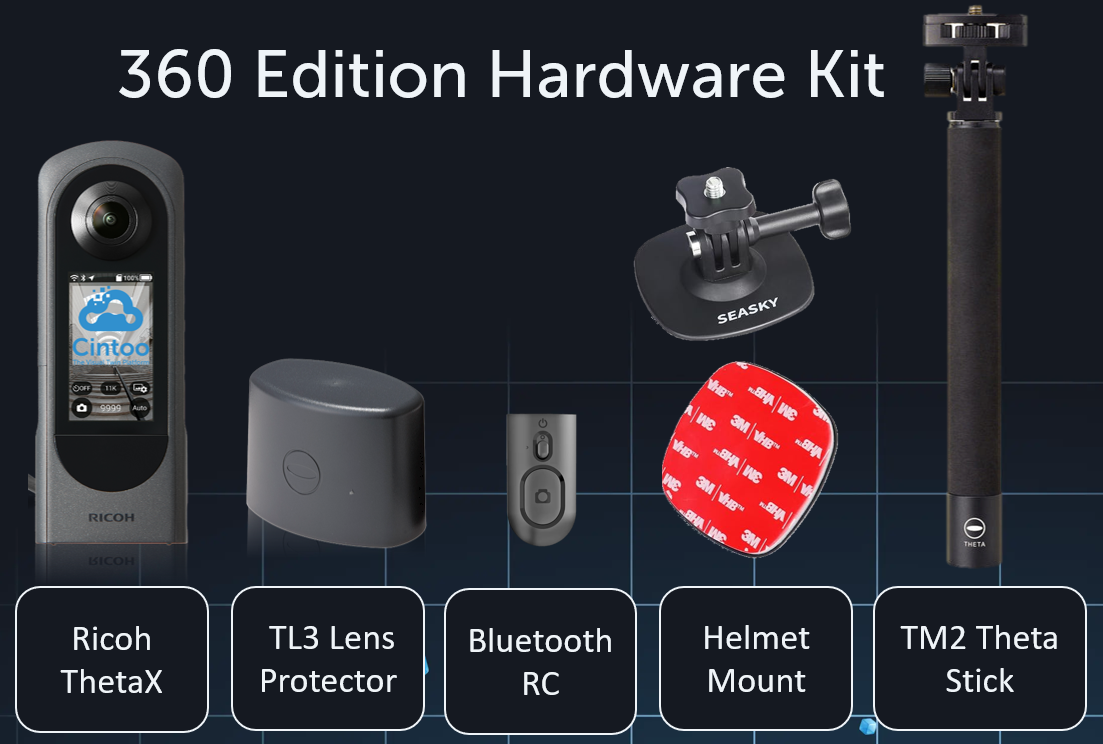
- Kameramiete – Zugriff auf zertifizierte Kameras vom Typ Ricoh THETA X als Teil des Abonnements
- Plugin „Simple Capture“ auf den Ricoh-Kameras vorinstalliert, mit voreingestellten Aufnahmeparametern
- Fernbedienung jeder einzelnen Kamera per Bluetooth zugeordnet, zum Starten/Stoppen der Videoaufnahme
- Funktionen für die Zusammenarbeit – visuelle 360-Daten in der gesamten Organisation teilen
- Crop- und Tagging-Funktionen - Schneiden Sie Ihre 3D-Daten zu und nutzen Sie die Tools von Cintoo zur Bearbeitung und Visualisierung von Tags (einschließlich Tag Crop IN/OUT, Click & Tag usw.)
- 360 Editions-Explorer – eigene Oberfläche zum Durchsuchen und Navigieren von 360-Aufnahmen
- 3D-Visualisierung – 360-Inhalte integriert in die vorhandenen Projektdaten anzeigen
- Gaussian Splatting – fortschrittliche 3D-Visualisierungstechnologie für eine immersive Darstellung
- Integration mit den Editionen TWIN und BIM – 360-Daten mit Punktwolken und Modellen kombinieren
Unterstützte 360-Kameras
Derzeit unterstützt 360 Edition:
- Ricoh THETA X
Ricoh THETA X wird im Rahmen des Abonnements von 360 Edition über ein Mietmodell bereitgestellt. Kameras im Besitz des Kunden, einschließlich separat erworbener Ricoh THETA X-Geräte, werden derzeit nicht unterstützt.
Erste Schritte
360 Edition setzt ein aktives Abonnement der Edition Twin oder BIM voraus und erweitert diese um 360-Aufnahmefunktionen.
Die Edition-Badges ändern ihr Erscheinungsbild, um die Erweiterung widerzuspiegeln.

Konto & Lizenz
- Abonnement aktivieren – Wenden Sie sich an Ihren Cintoo Customer Success Manager oder an sales@cintoo.com, um 360 Edition zu Ihrem bestehenden BIM- oder TWIN-Abonnement hinzuzufügen
- Ricoh-Kamerakit erhalten – Eine zertifizierte Ricoh THETA X und Zubehör werden an Ihren Standort geliefert (verfügbar in den USA, im Vereinigten Königreich, in der EU und in Kanada)
- Kamera verknüpfen – Die Kamera wird vom Cintoo-Team für Ihr Abonnement konfiguriert, einschließlich der Zuordnung zu einem regionalen Ricoh360 Cloud Tenant (US oder EU) entsprechend Ihrer Region und Ihren Präferenzen. Details finden Sie unter Administration → Abonnements.
- Projekt konfigurieren – Erstellen Sie eine eigene Arbeitszone, in die die 360-Videos importiert werden
Checkliste für die Ersteinrichtung
Vor Ihrer ersten Aufnahme:
☐ Prüfen Sie unter Administration → Abonnements, ob das Abonnement aktiv ist
☐ Bestätigen Sie, dass die Kamera mit Ihrem Konto verknüpft ist
☐ Aktualisieren Sie die Firmware der Kamera auf die neueste Version
☐ Erstellen oder wählen Sie eine Arbeitszone für den Import von Videos aus
☐ Lesen Sie die bewährten Vorgehensweisen für die Aufnahme
Typische Arbeitsabläufe
Visuelle Standortinspektionen
Führen Sie Inspektionen aus der Ferne durch, ohne dass alle Beteiligten physisch vor Ort sein müssen.
Verwenden Sie 360-Videos, um:
- den aktuellen Zustand des Standorts zu dokumentieren
- die Einhaltung von Sicherheitsstandards zu überprüfen
- Ausrüstung auf Korrosion oder Beschädigungen zu inspizieren
- visuelle Aufzeichnungen für Auditzwecke zu erstellen
Zusammenarbeit und virtuelle Standortbesuche
Ermöglichen Sie Projektteams, Auftragnehmern und weiteren Beteiligten, den Standort virtuell zu besuchen:
- Teammitgliedern aus der Ferne Kontext bieten
- Standortbedingungen mit Kunden und Lieferanten teilen
- Entscheidungen durch visuelle Nachweise unterstützen
- Den Bedarf an wiederholten Standortbesuchen verringern
Planung der Scan-Abdeckung
Erkennen Sie Lücken in der Laserscan-Abdeckung, bevor Sie kostspielige Scankampagnen planen:
- Bereiche visualisieren, die von Scans nicht ausreichend abgedeckt sind
- Festlegen, wo zusätzliche Scans erforderlich sind
- Scanzeitpläne auf Grundlage der visuellen Prüfung optimieren
Fortschrittsdokumentation
Erstellen Sie eine visuelle Zeitleiste der Projektentwicklung:
- Meilensteine der Bauausführung erfassen
- Installationsfortschritt dokumentieren
- As-built-Zustände mit den Plänen vergleichen
- Fortschrittsberichte durch visuelle Nachweise unterstützen
Vorbereitung für das Asset-Tagging
Nutzen Sie 360-Bilder als vorbereitenden Schritt zur Identifizierung von Assets:
- Ausrüstung identifizieren, die ein Tagging erfordert
- Detailliertere Laserscans vorbereiten
- Visuelle Inventare der Standort-Assets erstellen
Was als Nächstes kommt
Cintoo entwickelt 360 Edition kontinuierlich weiter. Geplante Erweiterungen umfassen:
- Erweiterte Vorab-Visualisierungsfunktionen
- Erweiterte Automatisierungsfunktionen
- Unterstützung zusätzlicher Geräte
- Erweiterte API-gesteuerte Arbeitsabläufe
Brauchen Sie Hilfe?
Wenn Sie Fragen haben oder Unterstützung benötigen:
- E-Mail-Support: support@cintoo.com / Neues Ticket erstellen
- Vertriebsanfragen: sales@cintoo.com
War dieser Artikel hilfreich?
Das ist großartig!
Vielen Dank für das Feedback
Leider konnten wir nicht helfen
Vielen Dank für das Feedback
Feedback gesendet
Wir wissen Ihre Bemühungen zu schätzen und werden versuchen, den Artikel zu korrigieren