この記事は、Progress Monitoringツールから抽出されたCIPMレポートを変換するためのPythonスクリプトを作成する方法について説明します。
- Revitモデルやその他のツールで使用されるBCFファイル
- Cintooプロジェクト内で、Coverage パラメータに基づいて問題のあるモデル要素に紐付けられた、フォーマット済みのアノテーション
権限: 役割に含まれる アノテーションの管理権限を持つユーザーは、このスクリプトを使用してアノテーションを作成できます。
スクリプトの例は添付ファイルにあります。 全ての補足スクリプトも添付されています。
目次
必須条件
選択したAIチャットボットの指示に従ってPythonをインストールしてください。 専用の環境がインストールされていない場合、コマンドプロンプトからPythonスクリプトを実行するための指示を尋ねてください。
このPythonスクリプトでは、次のライブラリを使用してワークフローを実行します。
スクリプトを使用する前にこれらをインストールしてください:
- png - ライブラリを接続するために次のコマンドを実行します
pip install pypng- requests - ライブラリを接続するために次のコマンドを実行します
pip install requests入力情報
コマンドプロンプトでスクリプトcreateBCF.py を実行します。 他の全てのスクリプトは補助スクリプトです。
python createBCF.py
スクリプトを実行すると、ユーザーに次の情報を入力するように求められます:
- CIPM .csvレポートのパスを入力 - 拡張子付きのCSV形式のCIPMレポートのフルパス
例: C:\Projects\ProgressMonitoring\Walls_0.0500(Meters).csv - BCFファイルを作成するパスを入力 - BCFファイルをローカルに作成して保存するためのフルパス
例: C:\Projects\ProgressMonitoring\BCF - 最小カバレッジを入力 - ユーザー定義の制限を設定し、カバレッジ 値をその下に厳密に取るために、パーセントで指定します。
例: スキャンカバレッジが25%未満のモデル要素に対してBCF/アノテーションを作成するために、25という値を入力 - アノテーションを作成する作業エリアのパスを入力 - Cintooプロジェクト内の作業エリアへのフルURLアドレス。
注意: このスクリプトで作成されたアノテーション用に専用の作業エリアを作成することを強くお勧めします。これにより、結果の制御がしやすくなり、必要に応じたクリーニングが簡単になります。
例: https://aec.cintoo.com/accounts/0a000a00-000a-000a-a0000aa0a00000a0/
projects/a0a0000a-aaa0000a-000a-aaaa00aaa000/workzones/aaaaaaaaaa0aaaaaaaa/data
このURLをブラウザから直接コピーしてください。
認証
すべてのパラメータを入力すると、ポップアップしたブラウザページでCintooアカウントの使用を許可するように求められます。 許可 をクリックして続行します。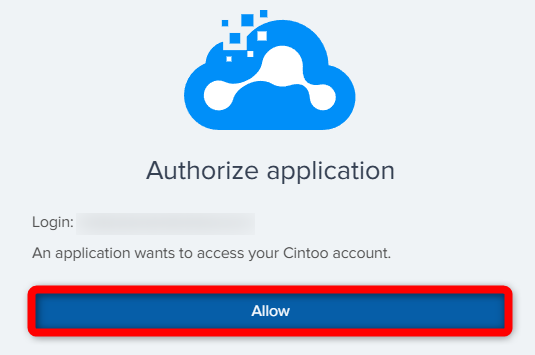
認証されると、次のメッセージが表示され、認証が成功したことを示します。 このブラウザタブは安全に閉じることができます。

Cintoo-tokens.json - 接続を確立するためにスクリプトによって作成される認証用JSON。 ジョブ終了後は、毎回削除することをお勧めします。
注意: BCFおよびアノテーションの生成にかかる時間は、カバレッジレベルの値とモデル要素の数に基づきます。
制限事項
警告: スクリプトを使用してAPIを使用する場合、最大3000のアノテーションを作成できることに注意してください。
結果
- BCFファイルはユーザー定義のパスにローカル保存され、(例えば)Revitで問題のあるモデル要素を検出して修正するために使用できます

- Cintoo アノテーション は、プロジェクト内で視覚的にモデル要素に結び付けられ、説明欄に必要なデータがすべて含まれます(編集可能)。

CreateBCF.py スクリプトの説明
以下に、各部分へのコメント付きのスクリプトを示します。
警告: コードに調整が必要な場合、調整は可能ですが、いったんコードを変更すると、その機能に関してCintooは一切責任を負いません。
import csv
import os
import zipfile
import png
from createAnnotation import createAnnotation
import login
from cintooUtils import parse_cintoo_workzone_context_url
import datetime
import uuid


def create_png(path):
    width = 255
    height = 255
    img = []
    for y in range(height):
        row = ()
        for x in range(width):
            row = row + (x, max(0, 255 - x - y), y)
        img.append(row)
    with open(path, 'wb') as f:
        w = png.Writer(width, height, greyscale=False)
        w.write(f, img)
メインスクリプトをサポートするために、必要なライブラリと補助スクリプトをすべてインポートします。 BCFファイルを作成するために必要なテンプレートpngを作成します。
def create_bcfzip(input_csv,
                  output_dir,
                  min_coverage,
                  tenant=None,
                  account_id=None,
                  project_id=None,
                  workzone_id=None,
                  camera_state=None,
                  headers=None):
    if not os.path.exists(output_dir):
        os.makedirs(output_dir)
    report_name = input_csv.split("\\")[-1]

    with open(input_csv, 'r', encoding='utf-8') as file:
        reader = csv.DictReader(file)
        elements_to_be_created = [row for row in reader if float(row['Coverage by Scan Data (%)']) < min_coverage]
        if len(elements_to_be_created) > 1000:
            print("More than 1000 elements have a lower score than the minimum coverage score. トップ1000件のみが作成されます。")
            elements_to_be_created = sorted(
                elements_to_be_created,
                key=lambda x: float(x['Coverage by Scan Data (%)']),
                reverse=True
            )[0:999]
        for row in elements_to_be_created:
            if (row.get('IfcGUID') or row.get('GlobalId')) and row.get('Coverage by Scan Data (%)'):
                print(row)
                try:
                    coverage = float(row['Coverage by Scan Data (%)'])
                    print(coverage)
                except ValueError:
                    continue
                guid = row.get('IfcGUID') or row.get('GlobalId')
                element_name = row.get('Model Element Name', 'Unknown')
                element_id = list(row.values())[0]
                print(element_id)
                create_bcf_file(guid, element_name, output_dir, coverage, report_name)
                if all([tenant, account_id, project_id, workzone_id, camera_state]):
                    createAnnotation(tenant,
                                     account_id,
                                     project_id,
                                     workzone_id,
                                     f'Low Coverage Issue: {element_name}',
                                     f"The element {element_name} has a coverage score of {coverage}, according to the report {report_name}",
                                     {"x": 0, "y": 0, "z": 0},
                                     camera_state,
                                     headers,
modelElementId=element_id)ユーザーによって定義されたCoverage パラメータに基づいて抽出された各要素に関連するBCFファイルを作成する関数です。
出力ディレクトリ、最小カバレッジ、Tenantなどのユーザー指定パラメータと、CIPMレポート行に存在するGUIDを解析し、カバレッジ比較に基づいて抽出します。
警告: create_bcfzip関数の変更は推奨されません。データ選択条件の動作を変更する必要がある場合にのみ変更してください(例: coverage<min_coverage)。 アノテーションのテキスト、説明、ラベリングを変更する場合は、create_issue_xml関数を参照してください。
def create_bcf_file(guid, element_name, output_dir, coverage, report_name):
    bcf_dir = os.path.join(output_dir, guid)
    os.makedirs(bcf_dir, exist_ok=True)
    viewpoint_guid = str(uuid.uuid4())
    comment_guid = str(uuid.uuid4())
    topic_guid = str(uuid.uuid4())
    project_guid = str(uuid.uuid4())

    viewpoint_filename = os.path.join(bcf_dir, 'viewpoint.bcfv')
    viewpoint_xml = create_viewpoint_xml(guid, viewpoint_guid)
    with open(viewpoint_filename, 'w', encoding='utf-8') as f:
        f.write(viewpoint_xml)

    issue_filename = os.path.join(bcf_dir, 'markup.bcf')
    issue_xml = create_issue_xml(element_name, coverage, report_name, viewpoint_guid, comment_guid, topic_guid)
    with open(issue_filename, 'w', encoding='utf-8') as f:
        f.write(issue_xml)

    project_filename = os.path.join(output_dir, 'project.bcfp')
    project_xml = create_project_xml(project_guid)
    with open(project_filename, 'w', encoding='utf-8') as f:
        f.write(project_xml)

    version_filename = os.path.join(output_dir, 'bcf.version')
    with open(version_filename, 'w', encoding='utf-8') as f:
        f.write(create_bcf_version())
    snapshot_filename = os.path.join(output_dir, 'snapshot.png')
    create_png(snapshot_filename)

    zip_filename = os.path.join(output_dir, f'{guid}.bcf')
    with zipfile.ZipFile(zip_filename, 'w') as zf:
        zf.write(viewpoint_filename, os.path.join(topic_guid, 'viewpoint.bcfv'))
        zf.write(issue_filename, os.path.join(topic_guid, 'markup.bcf'))
        zf.write(snapshot_filename, os.path.join(topic_guid, 'snapshot.png'))
        zf.write(project_filename, os.path.join('project.bcfp'))
        zf.write(version_filename, os.path.join('bcf.version'))

    # Cleanup
    os.remove(viewpoint_filename)
    os.remove(issue_filename)
    os.remove(project_filename)
    os.remove(version_filename)
    os.remove(snapshot_filename)
    os.rmdir(bcf_dir)
個別のBCFファイルを作成します。
def create_viewpoint_xml(guid, viewpoint_guid):
    return f"""<?xml version="1.0" encoding="UTF-8"?>
<VisualizationInfo Guid="{viewpoint_guid}">
	<Components>
		<ViewSetupHints SpacesVisible="false" SpaceBoundariesVisible="false" OpeningsVisible="false" />
		<Selection>
			<Component IfcGuid="{guid}" />
		</Selection>
		<Visibility DefaultVisibility="true" />
	</Components>
	<OrthogonalCamera>
		<CameraViewPoint>
			<X>129.93820633961636</X>
			<Y>-124.61204504554462</Y>
			<Z>104.47418360973809</Z>
		</CameraViewPoint>
		<CameraDirection>
			<X>-0.58963662529065941</X>
			<Y>0.5647967039409042</Y>
			<Z>-0.57735026918962584</Z>
		</CameraDirection>
		<CameraUpVector>
			<X>-0.41693605617897656</X>
			<Y>0.39937157934842415</Y>
			<Z>0.81649658092772603</Z>
		</CameraUpVector>
		<ViewToWorldScale>44.256083397559856</ViewToWorldScale>
	</OrthogonalCamera>
</VisualizationInfo>"""
デフォルトのカメラ位置を設定します。
def create_issue_xml(element_name, coverage, report_name, viewpoint_guid, comment_guid, topic_guid):
    return f"""<?xml version="1.0" encoding="UTF-8"?>
<Markup>
	<Topic Guid="{topic_guid}" TopicType="Issue" TopicStatus="Active">
		<Title>Low Coverage Issue: {element_name}</Title>
		<Priority>Normal</Priority>
		<Index>1</Index>
		<CreationDate>2025-03-05T09:22:02+00:00</CreationDate>
		<CreationAuthor>youremail@domain.com</CreationAuthor>
		<ModifiedDate>2025-03-05T09:22:03+00:00</ModifiedDate>
		<ModifiedAuthor>youremail@domain.com</ModifiedAuthor>
		<DueDate>2025-03-05T09:00:00+00:00</DueDate>
		<AssignedTo>youremail@domain.com</AssignedTo>
		<Description>The element {element_name} has a coverage score of {coverage}, according to the report {report_name}</Description>
	</Topic>
	<Comment Guid="{comment_guid}">
		<Date>2025-03-04T09:53:03+00:00</Date>
		<Author>youremail@domain.com</Author>
		<Comment>The element {element_name} has a coverage score of {coverage}, according to the report {report_name}</Comment>
		<Viewpoint Guid="{viewpoint_guid}" />
		<ModifiedDate>2025-03-04T09:53:03+00:00</ModifiedDate>
		<ModifiedAuthor>youremail@domain.com</ModifiedAuthor>
	</Comment>
	<Viewpoints Guid="{viewpoint_guid}">
		<Viewpoint>viewpoint.bcfv</Viewpoint>
		<Snapshot>snapshot.png</Snapshot>
	</Viewpoints>
</Markup>
    """
問題のメタデータ用XMLを作成します。
次のフィールドに著者に関する必要情報を入力します:
- CreationAuthor - 154行目
- ModifiedAuthor - 156行目
- AssignedTo - 158行目
- Author - 163行目
- ModifiedAuthor - 167行目
def create_project_xml(projectGuid):
    return f"""<?xml version="1.0" encoding="UTF-8"?>
<ProjectExtension>
	<Project ProjectId="{projectGuid}" />
	<ExtensionSchema></ExtensionSchema>
</ProjectExtension>"""
プロジェクトを参照するファイルを作成します。
def create_extensions_xsd():
    return """<?xml version="1.0" encoding="UTF-8" standalone="no" ?>
    <schema>
        <redefine schemaLocation="markup.xsd">
            <simpleType name="Priority">
                <restriction base="Priority">
                    <enumeration value="Aucune"/>
                    <enumeration value="Faible"/>
                    <enumeration value="Moyenne"/>
                    <enumeration value="Haute"/>
                    <enumeration value="Critique"/>
                </restriction>
            </simpleType>
            <simpleType name="TopicStatus">
                <restriction base="TopicStatus">
                    <enumeration value="Assignée"/>
                    <enumeration value="En cours"/>
                    <enumeration value="Terminée"/>
                    <enumeration value="Bloquée"/>
                    <enumeration value="Validée"/>
                    <enumeration value="Archivée"/>
                </restriction>
            </simpleType>
            <simpleType name="TopicLabel">
                <restriction base="TopicLabel"/>
            </simpleType>
        </redefine>
    </schema>
    """
BCF構造(カテゴリ)を記述します。
def create_bcf_version():
    return """<?xml version="1.0" encoding="UTF-8"?>
<Version VersionId="2.1" xsi:noNamespaceSchemaLocation="version.xsd" xmlns:xsi="http://www.w3.org/2001/XMLSchema-instance">
	<DetailedVersion>2.1 KUBUS BV</DetailedVersion>
</Version>"""
BCFバージョン(2.1)を定義します。
def main():
    input_csv = input("Insert the path to the CIPM .csv report :")
    output_dir = input("Insert the path where BCF files should be created :")
    min_coverage = float(input("Insert the minimum coverage"))
    context_url = input("Insert the path to the workzone where to create annotations (e.g: "
                        "https://aec.cintoo.com/accounts/0a000a00-000a-000a-a000-0aa0a00000a0/projects/a0a0000a-aaa0"
                        "-000a-000a-aaaa00aaa000/workzones/aaaaaaaaaa0aaaaaaaa/data ")
    context_details = parse_cintoo_workzone_context_url(context_url)
    tenant, account_id, project_id, workzone_id = context_details['tenant'], context_details['accountId'], \
        context_details['projectId'], context_details['workzoneId']

    # Authenticate and get access token
    login.load_tokens()
    token = login.get_token(tenant)
    headers = {"Authorization": f"Bearer {token}"}

    camera_state = {"type": "legacy",
                    "camerastate": {
                        "position": [0, 0, 1],
                        "rotationQuaternion": [0, 0, 0, 1],
                        "fov": 1.5708,
                        "ortho": False,
                        "overviewScale": 10,
                        "camType": "scan"},
                    }

    create_bcfzip(input_csv,
                  output_dir,
                  min_coverage,
                  tenant,
                  account_id,
                  project_id,
                  workzone_id,
                  camera_state,
                  headers)


main()ユーザーに入力質問を促すスクリプト主要部の定義、Cintoo API Authenticationに従ったCintooアカウントでのアクセストークン取得と認証、Cintooにインポート後に変更されるデフォルトのカメラ位置の設定、出力BCFzipファイルの作成、およびmain関数の実行。
CreateAnnotation.py スクリプトの説明
以下に、各部分へのコメント付きスクリプトを示します。
警告: コードの調整が必要な場合、調整は可能ですが、いったんコードを変更すると、その機能に関してCintooは一切責任を負いません。
import login
import requests
from cintooUtils import parse_cintoo_workzone_context_url

TIMEOUT = 10
メインスクリプトをサポートするために、補足スクリプトから必要なライブラリとデータをすべてインポートします。 タイムアウトパラメータを設定します。
def getWorkzoneGuid(tenant, account_id, project_id, workzone_idv1, headers):
    url = f"{tenant}/api/2/accounts/{account_id}/projects/{project_id}/workzones"

    response = requests.get(url, headers=headers, timeout=TIMEOUT)
    response.raise_for_status()
    return [wz for wz in response.json() if wz["api1Id"] == workzone_idv1]
ユーザー入力からworkzone IDを抽出します。
def createAnnotation(tenant,
                     account_id,
                     project_id,
                     workzone_id,
                     title,
                     description,
                     position,
                     saved_view,
                     headers,
                     modelElementId=None,):
    """Creates a project in the specified account."""
    workzone_guid = getWorkzoneGuid(tenant, account_id, project_id, workzone_id, headers)[0]['id'].split(':')[-1]
    url = f"{tenant}/api/2/accounts/{account_id}/projects/{project_id}/annotations"
    print(f"modelElementId : {modelElementId}")
    if modelElementId:
        body = {
            'workzoneId': workzone_guid,
            'annotationType': "Note",
            'title': title,
            'description': description,
            'position': position,
            'normal': {"x": 0, "y": 0, "z": 1},
            'savedView': {**saved_view, 'modelElementId': modelElementId},
        }
    else:
        body = {
            'workzoneId': workzone_guid,
            'annotationType': "Note",
            'title': title,
            'description': description,
            'position': position,
            'normal': {"x": 0, "y": 0, "z": 1},
            'savedView': saved_view,
            'elementId': "Toto"
        }
    print(url)
    print(body)
    response = requests.post(url, headers=headers, json=body, timeout=TIMEOUT)
    print(response.text)
    response.raise_for_status()

    return response.json()
ユーザー入力からCintooの位置情報を解析し、各アノテーションを対応するモデル要素に紐付けます。
def main(context_url):
    context_details = parse_cintoo_workzone_context_url(context_url)
    tenant, account_id, project_id, workzone_id = context_details['tenant'], context_details['accountId'], \
        context_details['projectId'], context_details['workzoneId']

    # Authenticate and get access token
    login.load_tokens()
    token = login.get_token(tenant)
    headers = {"Authorization": f"Bearer {token}"}

    camera_state = {"type": "legacy",
                    "camerastate": {
                        "position": [0, 0, 1],
                        "rotationQuaternion": [0, 0, 0, 1],
                        "fov": 1.5708,
                        "ortho": False,
                        "overviewScale": 10,
                        "camType": "scan"}}

    print(workzone_id)
    createAnnotation(tenant, account_id, project_id, workzone_id, "Test API", "Created with API",
                     {"x": 0, "y": 0, "z": 0}, camera_state, headers)
認証プロセスを含むメイン関数。カメラ位置を設定し、Cintooプロジェクトにアノテーションを作成します。
この記事は役に立ちましたか?
それは素晴らしい!
フィードバックありがとうございます
お役に立てず申し訳ございません!
フィードバックありがとうございます
フィードバックを送信しました
記事の改善におけるご協力ありがとうございます。