Cet article explique comment l’abonnement à l’édition 360 est géré, comment les données sont stockées et synchronisées, le cycle de vie des licences et les principes de sécurité des données.
TABLE DES MATIÈRES
- Ce que couvre l’abonnement 360 Edition
- Limites et règles d’utilisation
- Activation de licence et cycle de vie
- Principes d’hébergement des données et de sécurité
- Confidentialité et conformité
- Propriété et conservation des données
- Où obtenir de l'aide
Ce que couvre l’abonnement 360 Edition
Fonctionnalités principales
L'abonnement à l'édition 360 inclut :
- Location de caméra - accès à du matériel Ricoh THETA X certifié
- Importation et gestion de vidéos 360 - téléchargement et synchronisation automatiques depuis des caméras certifiées
- Traitement des vidéos 360 pour l’estimation de la pose, le floutage automatique des visages et la génération de Gaussian Splats
- 360 Edition Explorer - interface dédiée à la navigation et à la visualisation des captures 360
- Stockage - hébergement pour les vidéos 360 (Hébergement Cintoo)
- Visualisation - intégration avec la visionneuse 3D de Cintoo, y compris Gaussian Splats
- Alignement 3D de vos vidéos 360 avec les données de scan 3D ou un modèle 3D
- Fonctionnalités de collaboration - partage et contrôles d’accès pour les données 360
- Fonctionnalités de mesures 3D, d’annotations 3D et de balises 3D pour enrichir les données
- Support - assistance technique de l’équipe support de Cintoo
Intégration avec d’autres éditions
L’édition 360 étend les abonnements Cintoo existants :
- Compatible avec BIM Edition et TWIN Edition
- Nécessite un abonnement de base actif (BIM ou TWIN)
- Combine les données 360 avec des données de scan basées sur des maillages, des modèles et d’autres ressources de projet
- Partage les mêmes projets, zones de travail et autorisations utilisateur
Limites et règles d’utilisation
Stockage et volume des vidéos
Limites de taille des fichiers :
- Maximum 5 Go par fichier vidéo
- Les vidéos de plus de 9 minutes s’arrêtent automatiquement
Attribution de stockage :
- Environ 10 Go par caméra et par jour (utilisation typique)
- Contactez support@cintoo.com si vous anticipez une utilisation plus élevée
Attribution de caméras
- Une caméra par abonnement 360 Edition
- Les caméras supplémentaires nécessitent des abonnements supplémentaires
- Contactez sales@cintoo.com pour des déploiements multi-caméras
Téléchargement et traitement
- Les vidéos sont téléchargées automatiquement vers Ricoh360 Cloud lorsque la caméra se connecte au Wi-Fi
- Une fois téléchargées, les vidéos sont automatiquement supprimées du stockage de la caméra
- Les vidéos sont ensuite téléchargées sur les serveurs Cintoo et supprimées de Ricoh360 Cloud
- Les vidéos sont ensuite synchronisées avec votre compte Cintoo à la demande
- Le temps de traitement varie en fonction de la durée de la vidéo et de la charge système
Activation de licence et cycle de vie
Processus d’activation
Lorsque vous achetez un abonnement 360 Edition :
Étape 1 : Mise à disposition de l’abonnement
- Votre compte est activé par l’équipe Cintoo
Étape 2 : Vérifier le statut de l’abonnement
- Se connecter à Cintoo
- Accédez à Administration → Subscriptions
- Vérifiez que le badge Edition a été modifié pour l’abonnement actuel (BIM + 360 ou TWIN + 360).
Étape 3 : Lier votre caméra
- Une fois votre caméra arrivée, elle sera pré-liée à votre abonnement
- Vérifiez que la caméra 360 apparaît comme active pour votre abonnement dans Administration → Subscriptions
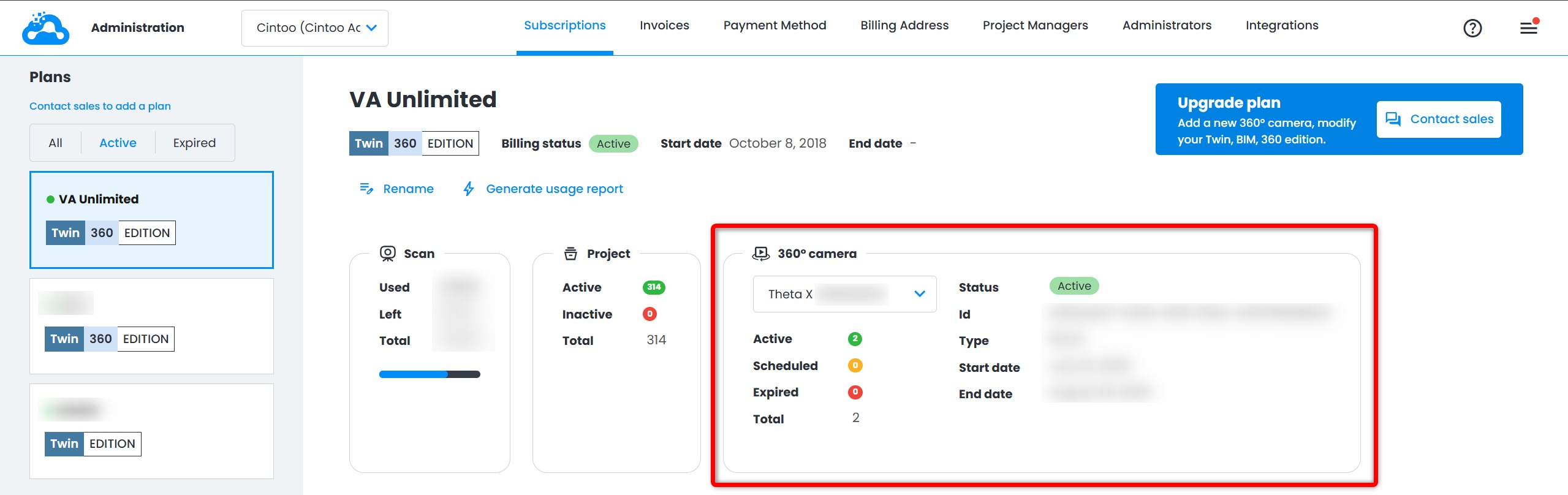
Étape 4 : Commencer à utiliser 360 Edition
- Commencez à capturer et à télécharger des vidéos 360
- Importez des vidéos dans vos projets via 360 Edition Explorer
Renouvellement de l’abonnement
- Les abonnements 360 Edition sont annuels
- Les notifications de renouvellement sont envoyées 30 jours avant l’expiration
- Contactez votre gestionnaire de compte ou sales@cintoo.com pour renouveler
Résiliation de l’abonnement
Si votre abonnement prend fin :
- Vous conserverez un accès en lecture seule aux vidéos 360 importées précédemment
- Vous ne pourrez pas importer de nouvelles vidéos
- Vous devez retourner la caméra dans un délai de 8 jours ouvrables à vos frais
- Les politiques de conservation des données s’appliquent
Remarque: après la date d’expiration de l’abonnement, les données 360 passent en mode affichage uniquement. Aucune donnée ne pourra être modifiée ou supprimée à ce stade.
Principes d’hébergement des données et de sécurité
Où vos données sont hébergées
Les données vidéo 360 sont hébergées dans l’infrastructure Cloud sécurisée de Cintoo :
- Stockage principal : Microsoft Azure, AWS ou Google Cloud platforms
- Régions géographiques : les données sont stockées conformément aux réglementations régionales
- Redondance : les données sont sauvegardées automatiquement sur plusieurs emplacements
Vous trouverez plus d’informations sur l’hébergement et les sujets connexes dans Options d’hébergement Cintoo et cybersécurité.
Intégration avec Ricoh360 Cloud
Les vidéos sont d’abord téléchargées vers Ricoh360 Cloud (AWS US), à partir de là, les vidéos sont synchronisées avec l’infrastructure de Cintoo à la demande.
Confidentialité et conformité
Principes de confidentialité des données
Cintoo respecte les principes de confidentialité suivants :
- Propriété des données client : vous possédez toutes les données que vous téléchargez vers Cintoo
- Aucun accès non autorisé : le personnel de Cintoo n’accède pas à vos données sans autorisation explicite (p. ex., à des fins de support avec votre consentement)
- Aucune exploitation des données : vos données ne sont pas utilisées pour l’entraînement, l’analytique ou d’autres finalités sans consentement
- Transparence : vous pouvez demander des informations sur la manière dont vos données sont stockées et traitées
Référentiels de conformité
Pour des questions juridiques et de conformité détaillées, contactez votre équipe juridique ou le service juridique de Cintoo à l’adresse privacy@cintoo.com.
Données personnelles dans les vidéos 360
Les vidéos 360 peuvent capturer involontairement des informations personnelles :
- Visages des personnes sur site
- Plaques d’immatriculation des véhicules
- Effets personnels ou informations identifiables
Vos responsabilités :
- Soyez conscient de ce qui est capturé dans les vidéos 360
- Conformez-vous aux lois et règlements locaux sur la vie privée
- Informez le personnel du site lors de la capture d'images à 360
- Mettez en œuvre vos propres politiques de confidentialité selon les besoins
Limitations actuelles :
- Seul le floutage automatique des visages est appliqué par défaut
- Notre équipe de recherche étudie d’autres options de floutage qui pourraient être appliquées aux vidéos 360
- Vous êtes responsable de l'activation de l'anonymisation lorsqu'elle est nécessaire
Pour les questions ou préoccupations relatives à la confidentialité : privacy@cintoo.com
Propriété et conservation des données
Propriété des données
- Vous possédez toutes les données vidéo 360 que vous capturez et téléchargez vers Cintoo
- Cintoo agit en tant que prestataire de services et sous-traitant, et non en tant que propriétaire des données
- Vous conservez tous les droits de propriété intellectuelle sur vos données
Conservation des données pendant un abonnement actif
- Une fois qu’une vidéo est téléchargée vers Ricoh360 Cloud, elle est automatiquement supprimée de la caméra
- Toutes les vidéos 360 restent dans votre compte indéfiniment tant que votre abonnement est actif
- Vous pouvez supprimer des vidéos de Cintoo à tout moment
- Les vidéos supprimées sont retirées du projet, mais peuvent être réimportées depuis Ricoh360 Cloud
Remarque: après la date d’expiration de l’abonnement, les données 360 passent en mode affichage uniquement. Aucune donnée ne pourra être modifiée ou supprimée à ce stade.
Où obtenir de l'aide
Assistance technique:
- E-mail: support@cintoo.com
- Incluez une description détaillée du problème
Demandes commerciales et de facturation:
- E-mail: sales@cintoo.com
- Contactez votre Customer Success Manager dédié
Confidentialité :
- E-mail: privacy@cintoo.com
- Contact pour les questions ou préoccupations relatives à la confidentialité
Cet article a-t-il été utile ?
C'est super !
Merci pour votre commentaire
Désolé ! Nous n'avons pas pu vous être utile
Merci pour votre commentaire
Commentaires envoyés
Nous apprécions vos efforts et nous allons corriger l'article