This article explains how 360 Edition subscription is managed, how the data is stored and synchronized, license lifecycle, and data security principles.
TABLE OF CONTENTS
- What 360 Edition Subscription Covers
- Usage Limits and Rules
- License Activation and Lifecycle
- Data Hosting and Security Principles
- Privacy and Compliance
- Data Ownership and Retention
- Where to Get Help
What 360 Edition Subscription Covers
Core Capabilities
Every 360 Edition subscription includes:
- Camera rental - access to certified Ricoh THETA X hardware
- 360 video import and management - automated upload and synchronization from certified cameras
- 360 video processing for pose estimation, automatic face blurring and Gaussian Splats generation
- 360 Edition Explorer - dedicated interface for navigating 360 captures
- Storage - hosting for 360 videos (Cintoo hosting)
- Visualization - integration with Cintoo's 3D viewer, including Gaussian Splats
- 3D alignment of your 360 videos with 3D scan data or 3D model
- Collaboration features - sharing and access controls for 360 data
- 3D measurements, 3D annotations and 3D tagging features to enrich the data
- Support - technical assistance from Cintoo's support team
Integration with Other Editions
360 Edition extends existing Cintoo subscriptions:
- Compatible with BIM Edition and TWIN Edition
- Requires an active base subscription (BIM or TWIN)
- Combines 360 data with mesh-based scan data, models, and other project assets
- Shares the same projects, work zones, and user permissions
Usage Limits and Rules
Video Storage and Volume
File size limits:
- Maximum 5 GB per video file
- Videos longer than 9 minutes are automatically stopped
Storage allocation:
- Approximately 10 GB per camera per day (typical usage)
- Contact support@cintoo.com if you anticipate higher usage
Camera Allocation
- One camera per 360 Edition subscription
- Additional cameras require additional subscriptions
- Contact sales@cintoo.com for multi-camera deployments
Upload and Processing
- Videos are uploaded automatically to Ricoh360 Cloud when the camera connects to Wi-Fi
- Once uploaded videos are removed automatically from camera storage
- Then videos are uploaded to Cintoo servers and removed from Ricoh360 Cloud
- Videos are then synchronized to your Cintoo account on demand
- Processing time varies based on video length and system load
License Activation and Lifecycle
Activation Process
When you purchase a 360 Edition subscription:
Step 1: Subscription provisioning
- Your account is activated by Cintoo team
Step 2: Verify subscription status
- Log in to Cintoo
- Navigate to Administration → Subscriptions
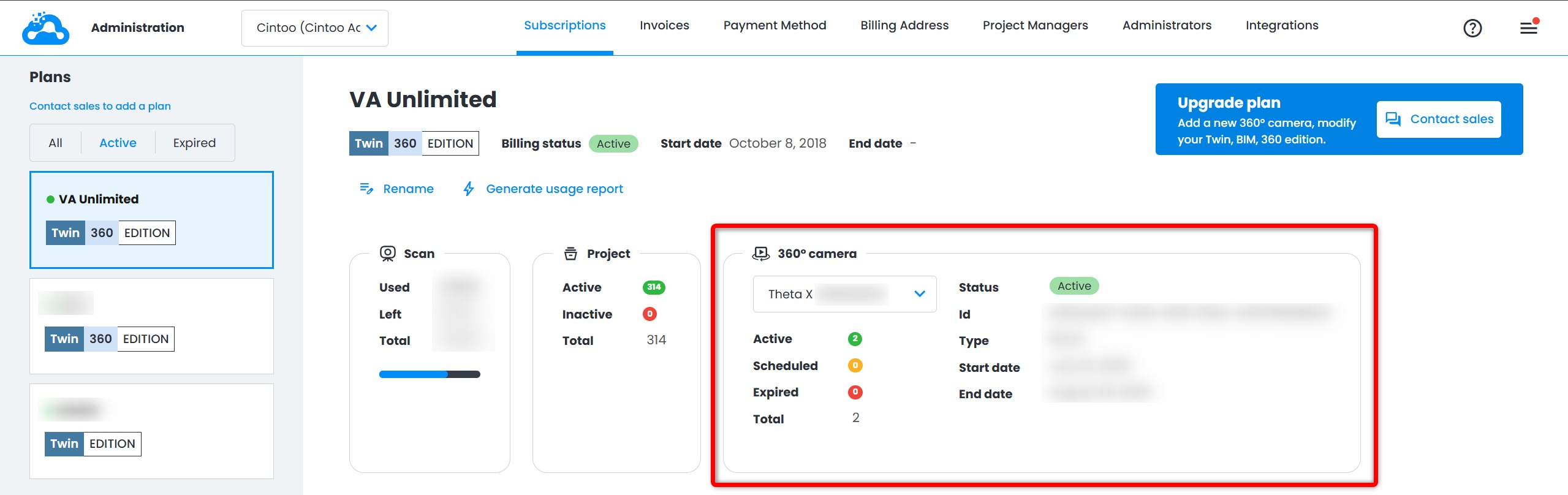
- Verify that Edition badge is changed for current subscription (BIM + 360 or TWIN + 360).
Step 3: Link your camera
- Once your camera arrives, it will be pre-linked to your subscription
- Verify 360 camera appears as active for your subscription in Administration → Subscriptions
Step 4: Start using 360 Edition
- Begin capturing and uploading 360 videos
- Import videos into your projects via 360 Edition Explorer
Subscription Renewal
- 360 Edition subscriptions are annual
- Renewal notifications are sent 30 days before expiration
- Contact your account manager or sales@cintoo.com to renew
Subscription Termination
If your subscription ends:
- You will retain read-only access to previously imported 360 videos
- You will not be able to import new videos
- You must return the camera within 8 business days at your own expenses
- Data retention policies apply
Data Hosting and Security Principles
Where Your Data is Hosted
360 video data is hosted in Cintoo's secure cloud infrastructure:
- Primary storage: Microsoft Azure, AWS or Google cloud platforms
- Geographic regions: data is stored in compliance with regional regulations
- Redundancy: data is backed up automatically across multiple locations
More information about hosting and related topics could be found in Cintoo Hosting Options and Cybersecurity.
Integration with Ricoh360 Cloud
Videos are initially uploaded to a regional Ricoh360 Cloud tenant - US (AWS) or EU - assigned based on your region and preferences, from there, videos are synced to Cintoo's infrastructure on demand. EU tenant keeps capture data within the EU region, supporting data residency requirements.
Privacy and Compliance
Data Privacy Principles
Cintoo adheres to the following privacy principles:
- Customer data ownership: you own all data you upload to Cintoo
- No unauthorized access: Cintoo staff do not access your data without explicit permission (e.g., for support purposes with your consent)
- No data mining: your data is not used for training, analytics, or other purposes without consent
- Transparency: you can request information about how your data is stored and processed
Compliance Frameworks
For detailed legal and compliance questions, contact your legal team or Cintoo's legal department at privacy@cintoo.com.
Personal Data in 360 Videos
360 videos may inadvertently capture personal information:
- Faces of individuals on site
- License plates of vehicles
- Personal belongings or identifiable information
Your responsibilities:
- Be aware of what is captured in 360 videos
- Comply with local privacy laws and regulations
- Inform site personnel when capturing 360 imagery
- Implement your own privacy policies as needed
Current limitations:
- Only automatic faces blurring is applied by default
- Our Research Team is discovering more blurring options that could be applied to 360 videos
- You are responsible for enabling anonymization when needed
For privacy questions or concerns: privacy@cintoo.com
Data Ownership and Retention
Data Ownership
- You own all 360 video data you capture and upload to Cintoo
- Cintoo acts as a service provider and processor, not a data owner
- You retain all intellectual property rights to your data
Data Retention During Active Subscription
- Once a video is uploaded to Ricoh360 Cloud it's automatically removed from camera
- All 360 videos remain in your account indefinitely while your subscription is active
- You can delete videos from Cintoo at any time
- Deleted videos are removed from the project, but can be reimported back from Ricoh360 Cloud
Where to Get Help
Technical support:
- Email: support@cintoo.com
- Include detailed description of the issue
Sales and billing inquiries:
- Email: sales@cintoo.com
- Contact your dedicated Customer Success Manager
Privacy:
- Email: privacy@cintoo.com
- Contact for privacy questions or concerns
Was this article helpful?
That’s Great!
Thank you for your feedback
Sorry! We couldn't be helpful
Thank you for your feedback
Feedback sent
We appreciate your effort and will try to fix the article