Dieser Artikel erläutert, wie das 360-Edition-Abonnement verwaltet wird, wie die Daten gespeichert und synchronisiert werden, den Lizenzlebenszyklus sowie die Grundsätze der Datensicherheit.
INHALTSVERZEICHNIS
- Was das 360-Edition-Abonnement abdeckt
- Nutzungsbeschränkungen und Regeln
- Lizenzaktivierung und Lebenszyklus
- Datenhosting und Sicherheitsprinzipien
- Privacy-and-Compliance
- Data-Ownership-and-Retention
- Wo Sie Hilfe erhalten
Was das 360-Edition-Abonnement abdeckt
Kernfunktionen
Das 360-Edition-Abonnement umfasst:
- Kameraverleih - Zugriff auf zertifizierte Ricoh THETA X-Hardware
- 360°-Videoimport und -verwaltung - automatisierter Upload und Synchronisierung von zertifizierten Kameras
- 360°-Videoverarbeitung zur Posenschätzung, automatische Unschärfe von Gesichtern und Generierung von Gaussian Splats
- 360 Edition Explorer - dedizierte Schnittstelle zum Navigieren in 360°-Aufnahmen
- Speicherung - Hosting für 360°-Videos (Cintoo-Hosting)
- Visualisierung - Integration mit Cintoos 3D-Viewer, einschließlich Gaussian Splats
- 3D-Ausrichtung Ihrer 360-Videos an 3D-Scandaten oder ein 3D-Modell
- Kollaborationsfunktionen - Freigabe- und Zugriffskontrollen für 360°-Daten
- 3D-Messungen, 3D-Anmerkungen und 3D-Tagging Funktionen zur Anreicherung der Daten
- Support - Technische Unterstützung durch das Support-Team von Cintoo
Integration mit anderen Editionen
Die 360 Edition erweitert bestehende Cintoo-Abonnements:
- Kompatibel mit BIM Edition und TWIN Edition
- Erfordert ein aktives Basisabonnement (BIM oder TWIN)
- Kombiniert 360°-Daten mit meshbasierten Scandaten, Modellen und anderen Projekt-Assets
- Teilt dieselben Projekte, Arbeitsbereiche und Benutzerberechtigungen
Nutzungsbeschränkungen und Regeln
Videospeicher und Volumen
Dateigrößenbeschränkungen:
- Maximal 5 GB pro Videodatei
- Videos, die länger als 9 Minuten sind, werden automatisch gestoppt
Speicherzuweisung:
- Ungefähr 10 GB pro Kamera pro Tag (typische Nutzung)
- Kontaktieren Sie support@cintoo.com wenn Sie einen höheren Verbrauch erwarten
Kamerazuweisung
- Eine Kamera pro 360-Edition-Abonnement
- Zusätzliche Kameras erfordern zusätzliche Abonnements
- Kontaktieren Sie sales@cintoo.com für Bereitstellungen mit mehreren Kameras
Upload und Verarbeitung
- Videos werden automatisch in Ricoh360 Cloud hochgeladen, wenn sich die Kamera mit WLAN verbindet
- Nach dem Upload werden Videos automatisch aus dem Kameraspeicher entfernt
- Anschließend werden Videos auf Cintoo-Server hochgeladen und aus Ricoh360 Cloud entfernt
- Videos werden dann auf Anfrage mit Ihrem Cintoo-Konto synchronisiert
- Die Verarbeitungszeit variiert je nach Videolänge und Systemauslastung
Lizenzaktivierung und Lebenszyklus
Aktivierungsprozess
Wenn Sie ein 360-Edition-Abonnement erwerben:
Schritt 1: Bereitstellung des Abonnements
- Ihr Konto wird vom Cintoo-Team aktiviert
Schritt 2: Abonnementstatus prüfen
- Bei Cintoo anmelden
- Navigieren Sie zu Administration → Subscriptions
- Prüfen Sie, ob das Edition-Badge für das aktuelle Abonnement (BIM + 360 oder TWIN + 360) geändert wurde.
Schritt 3: Kamera verknüpfen
- Sobald Ihre Kamera eintrifft, ist sie bereits mit Ihrem Abonnement vorverknüpft
- Prüfen Sie, ob die 360°-Kamera für Ihr Abonnement unter Administration → Subscriptions als aktiv angezeigt wird
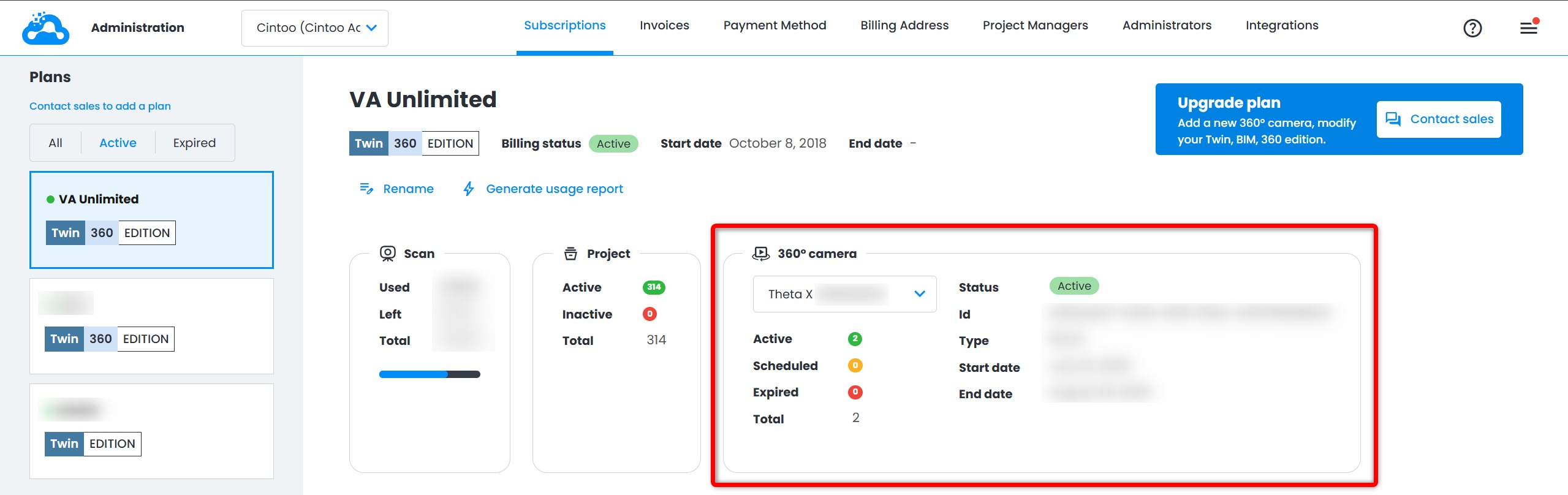
Schritt 4: 360 Edition nutzen
- Beginnen Sie mit der Aufnahme und dem Upload von 360°-Videos
- Videos importieren Sie über den 360 Edition Explorer in Ihre Projekte
Abonnementverlängerung
- 360-Edition-Abonnements sind jährlich
- Verlängerungsbenachrichtigungen werden 30 Tage vor Ablauf gesendet
- Kontaktieren Sie Ihren Account Manager oder sales@cintoo.com, um zu verlängern
Abonnementkündigung
Wenn Ihr Abonnement endet:
- Sie behalten Schreibgeschützten Zugriff auf zuvor importierte 360-Videos
- Sie werden keine neuen Videos importieren können
- Sie müssen die Kamera innerhalb von 8 Werktagen auf eigene Kosten zurückgeben
- Richtlinien zur Datenaufbewahrung gelten
Hinweis: Nach Ablauf des Abonnements werden 360°-Daten in den Nur-Ansicht-Modus versetzt. Zu diesem Zeitpunkt können keine Daten bearbeitet oder gelöscht werden.
Datenhosting und Sicherheitsprinzipien
Wo Ihre Daten gehostet werden
360-Videodaten werden in Cintoos sicherer Cloud-Infrastruktur gehostet:
- Primärer Speicher: Microsoft Azure, AWS oder Google Cloud-Plattformen
- Geografische Regionen: Daten werden in Übereinstimmung mit regionalen Vorschriften gespeichert
- Redundanz: Daten werden automatisch an mehreren Standorten gesichert
Weitere Informationen zum Hosting und verwandten Themen finden Sie unter Cintoo Hosting-Optionen und Cybersicherheit.
Integration-with-Ricoh360-Cloud
Videos werden zunächst in Ricoh360 Cloud (AWS US) hochgeladen, von dort werden die Videos bei Bedarf mit Cintoos Infrastruktur synchronisiert.
Privacy-and-Compliance
Data-Privacy-Principles
Cintoo hält sich an die folgenden Datenschutzgrundsätze:
- Eigentum an Kundendaten: Sie besitzen alle Daten, die Sie in Cintoo hochladen
- Kein unbefugter Zugriff: Cintoo-Mitarbeiter greifen ohne ausdrückliche Erlaubnis nicht auf Ihre Daten zu (z. B. zu Supportzwecken mit Ihrer Zustimmung)
- Kein Data Mining: Ihre Daten werden ohne Zustimmung nicht für Training, Analysen oder andere Zwecke verwendet
- Transparenz: Sie können Informationen darüber anfordern, wie Ihre Daten gespeichert und verarbeitet werden
Compliance-Frameworks
Für detaillierte rechtliche und Compliance-Fragen wenden Sie sich an Ihr Rechtsteam oder an die Rechtsabteilung von Cintoo unter privacy@cintoo.com.
Personal-Data-in-360-Videos
360°-Videos können unbeabsichtigt personenbezogene Informationen erfassen:
- Gesichter von Personen vor Ort
- Kfz-Kennzeichen von Fahrzeugen
- Persönliche Gegenstände oder identifizierbare Informationen
Ihre Verantwortlichkeiten:
- Seien Sie sich bewusst, was in 360-Videos erfasst wird
- Halten Sie sich an lokale Datenschutzgesetze und -vorschriften
- Informieren Sie das Personal vor Ort bei der Erstellung von 360-Bildmaterial
- Implementieren Sie bei Bedarf eigene Datenschutzrichtlinien
Aktuelle Einschränkungen:
- Nur die automatische Unschärfe von Gesichtern wird standardmäßig angewendet
- Unser Forschungsteam untersucht weitere Unschärfe-Optionen, die auf 360 Videos angewendet werden könnten
- Sie sind verantwortlich für die Aktivierung der Anonymisierung, wenn nötig
Bei Datenschutzfragen oder -bedenken: privacy@cintoo.com
Data-Ownership-and-Retention
Data-Ownership
- Sie besitzen alle 360°-Videodaten, die Sie erfassen und in Cintoo hochladen
- Cintoo agiert als Dienstleister und Auftragsverarbeiter, nicht als Dateninhaber
- Sie behalten alle Rechte an geistigem Eigentum an Ihren Daten
Data-Retention-During-Active-Subscription
- Sobald ein Video in Ricoh360 Cloud hochgeladen wird, wird es automatisch von der Kamera entfernt
- Alle 360-Videos bleiben während Ihres aktiven Abonnements dauerhaft in Ihrem Konto
- Sie können Videos jederzeit aus Cintoo löschen
- Gelöschte Videos werden aus dem Projekt entfernt, können aber wieder aus Ricoh360 Cloud reimportiert werden
Hinweis: Nach Ablauf des Abonnements werden 360°-Daten in den Nur-Ansicht-Modus versetzt. Zu diesem Zeitpunkt können keine Daten bearbeitet oder gelöscht werden.
Wo Sie Hilfe erhalten
Technischer Support:
- E-Mail: support@cintoo.com
- Fügen Sie eine detaillierte Beschreibung des Problems bei
Vertriebs- und Abrechnungsanfragen:
- E-Mail: sales@cintoo.com
- Kontaktieren Sie Ihren dedizierten Customer Success Manager
Datenschutz:
- E-Mail: privacy@cintoo.com
- Kontakt bei Datenschutzfragen oder -bedenken
War dieser Artikel hilfreich?
Das ist großartig!
Vielen Dank für das Feedback
Leider konnten wir nicht helfen
Vielen Dank für das Feedback
Feedback gesendet
Wir wissen Ihre Bemühungen zu schätzen und werden versuchen, den Artikel zu korrigieren